Blog
How to automate loan repayments with M-Pesa


If you run a microfinance institution, SACCO,microcredit, digital credit providers (DCP) or digital lending business in Kenya, you already know that collecting loan repayments is one of the most time-consuming and error-prone parts of your operations. Borrowers miss deadlines, staff spend hours reconciling payments, and cash flow becomes unpredictable.
The good news? M-Pesa has transformed how Kenyan lenders can collect and disburse money — and when integrated with a modern Loan Management System (LMS), it creates a fully automated repayment cycle that saves time, reduces errors, and dramatically improves your borrowers’ experience.
This guide walks you through exactly how M-Pesa loan repayment automation works, what you need to set it up, and the measurable results you can expect.
Why Manual Loan Repayment Collection Is Costing You
Before diving into the solution, let’s be honest about the problem. If your lending business still relies on manual repayment collection — whether through cash, bank deposits, or even unintegrated M-Pesa — you are likely experiencing:
- Delayed reconciliation: Your loan officers spend hours or days matching M-Pesa messages to loan accounts.
- Payment misallocation: Repayments get applied to the wrong loan or the wrong borrower entirely.
- Missed arrears alerts: You don’t find out a borrower is behind until the problem has compounded.
- High operational cost: Every manual touchpoint costs staff time and introduces human error.
- Poor borrower experience: Borrowers have no real-time visibility into their loan balance or repayment history.
How M-Pesa Integration Works in a Loan Management System
Modern loan management platforms like Loansoft integrate with Safaricom’s M-Pesa API through two key mechanisms:
1. M-Pesa C2B (Customer to Business) — Loan Repayments
C2B integration means borrowers pay their loan repayments directly to your business Paybill or Till number via M-Pesa. Here is what happens automatically:
- The borrower sends money via M-Pesa to your Paybill number, using their account number (usually their ID Number, account number or phone number).
- Safaricom’s API sends an instant notification to your Loan Management System.
- The LMS automatically identifies the borrower, matches the payment to the correct loan, and updates the balance in real time.
- The borrower receives an SMS confirmation of their updated loan balance.
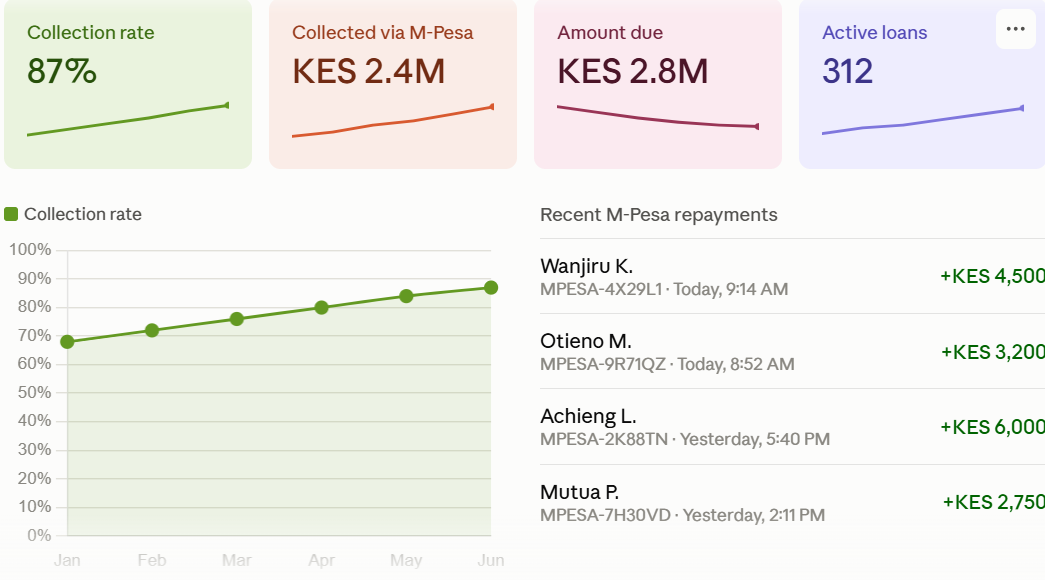
- Your dashboard reflects the payment immediately — no manual entry required.
“With Loansoft’s M-Pesa C2B integration, a repayment made at 11 PM on a Sunday is reconciled in your system before the borrower puts their phone down.”
2. M-Pesa B2C (Business to Customer) — Loan Disbursements
B2C works in the other direction: your system automatically sends approved loan amounts directly to borrowers’ M-Pesa wallets. This means:
- Loan officer approves a loan application in the LMS.
- The system triggers an M-Pesa B2C API call automatically.
- The borrower receives funds on their phone within seconds.
- The disbursement is logged against the loan record automatically.
The result is a fully digital lending cycle — from application to disbursement to repayment — with no cash handling and minimal human intervention.
Step-by-Step: Setting Up M-Pesa Loan Repayment Automation
Step 1: Register a Safaricom Business Paybill or Buy Goods Till
You need a registered Safaricom Paybill number for C2B collections. If you are a registered business in Kenya, apply through the Safaricom Business portal.
Step 2: Apply for M-Pesa API Access via Daraja
Safaricom’s developer platform — Daraja — is where you register your application and obtain API credentials (Consumer Key and Consumer Secret). You will need to apply for both C2B and B2C API access, which requires Safaricom approval and a brief compliance review.
Step 3: Choose a Loan Management System with Native M-Pesa Integration
This is the critical step. Not all loan management systems offer built-in M-Pesa integration. Some require expensive custom development. Loansoft comes with M-Pesa C2B and B2C integration already built in, meaning you only need to enter your Paybill number and API credentials in the settings — no custom coding required.
Step 4: Configure Repayment Matching Rules
In your LMS, you define how incoming payments are matched to borrowers. Common matching methods include:
- Phone number matching: The borrower’s M-Pesa number is matched to their registered phone number in the system.
- Account number matching: The borrower enters their loan ID as the account reference when paying.
- Name matching with manual fallback: For unmatched payments, the system queues them for manual review rather than losing them.
Step 5: Configure SMS Notifications
Set up automated SMS alerts so borrowers receive confirmation when a payment is received, reminders 3–5 days before due dates, and arrears notifications when payments are missed. Loansoft integrates with bulk SMS providers to handle this automatically.
Real Results: What Automation Delivers
Lending businesses that switch from manual to automated M-Pesa repayment collection consistently report:
- 80–90% reduction in time spent on payment reconciliation.
- Near-zero payment misallocation errors.
- Faster arrears detection — typically within 24 hours of a missed payment.
- Improved borrower satisfaction due to instant payment confirmation.
- Better cash flow visibility for management and investors.
One Loansoft client — a microfinance firm in Kisumu — reduced their end-of-month reconciliation process from three days to under two hours after enabling M-Pesa C2B integration.
Common Questions About M-Pesa Loan Integration
Do borrowers need smartphones?
No. M-Pesa works on any mobile phone, including basic feature phones. Borrowers simply use the standard M-Pesa menu to pay to your Paybill number. No app is required on the borrower’s side.
What happens if a payment comes in with no account reference?
Loansoft LMS will queue unmatched payments for manual review rather than rejecting or losing them. Loansoft’s reconciliation module flags these payments and allows your team to manually assign them within a simple dashboard workflow.
Getting Started with Loansoft’s M-Pesa Integration
If you are ready to automate your loan repayment collection, Loansoft offers a free demo that includes a full walkthrough of M-Pesa C2B and B2C integration. Our onboarding team will help you configure your Paybill settings, test the integration in a sandbox environment, and go live — typically within one week of setup.
Whether you manage 50 loans or 50,000, automated M-Pesa repayment processing is one of the highest-ROI investments you can make in your lending operations.
Ready to see it in action? Book a free Loansoft demo at loansoftea.com and experience automated M-Pesa loan management firsthand.