Blog
Loan management system with USSD integration.

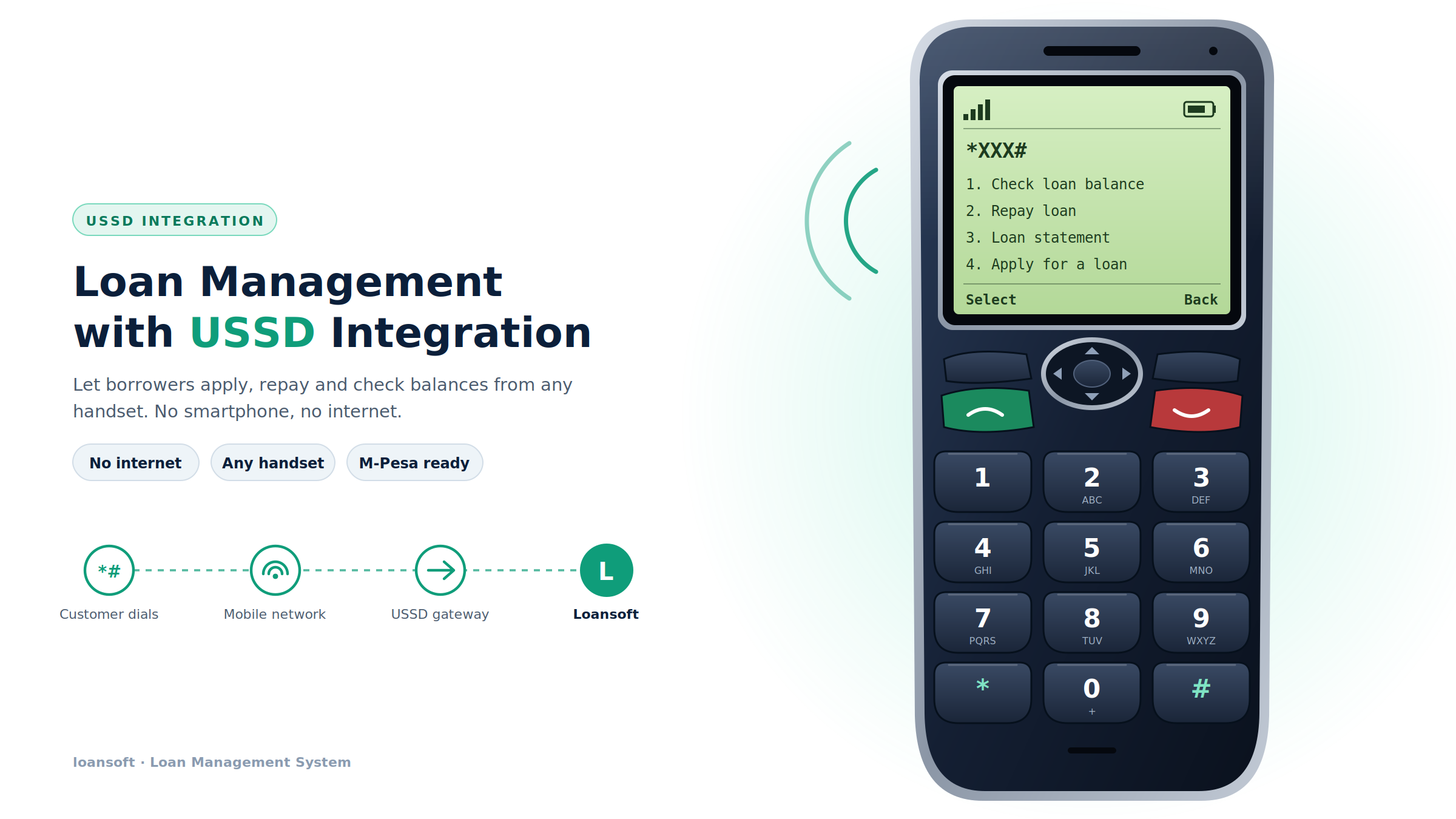
A loan management system with USSD integration lets borrowers apply for loans, check balances, view statements, and repay using a simple shortcode such as *XXX#—without a smartphone, mobile app, or internet connection. For Kenyan microfinance institutions, digital lenders, and chamas, USSD makes lending accessible to customers on any mobile network and handset.
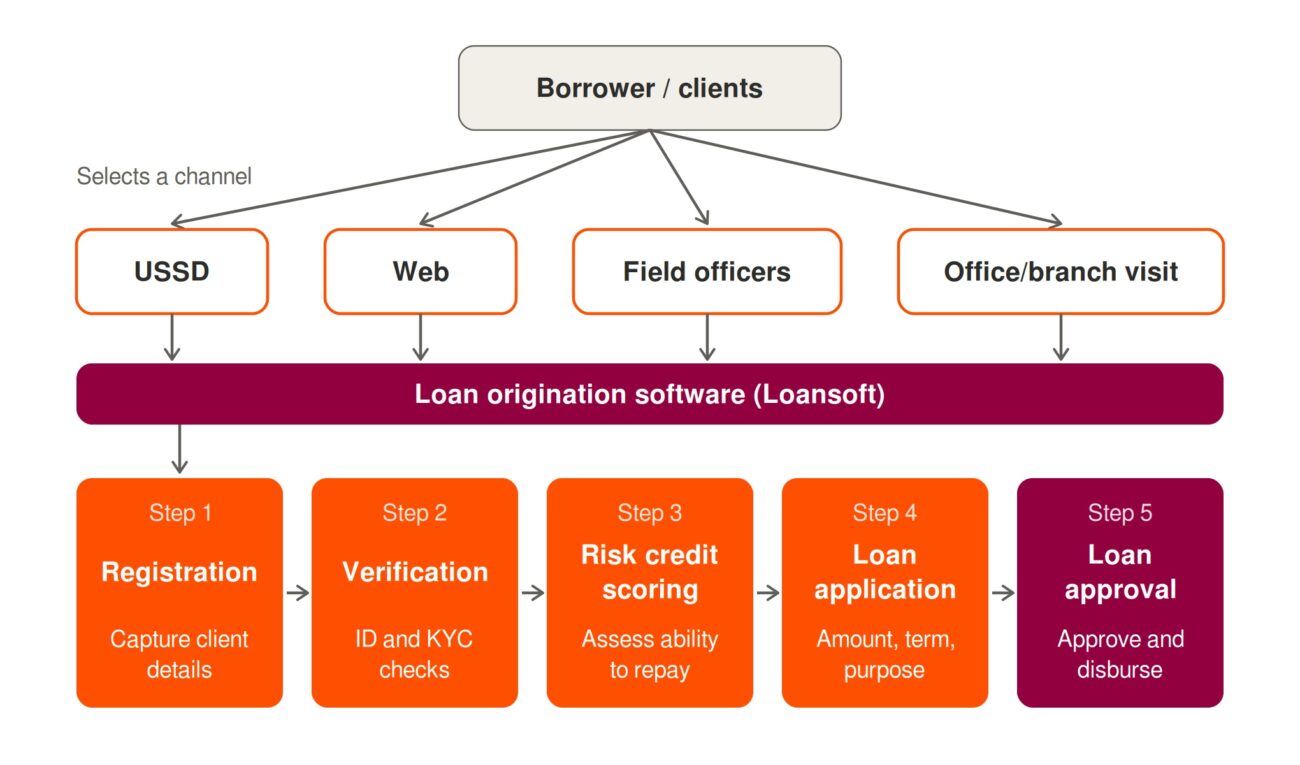
Loansoft is an end-to-end, cloud-based loan management system that supports client onboarding, loan origination, approvals, disbursement, repayments, collections, reporting, M-Pesa integration, bulk SMS, CRB checks, and USSD integration.
What Is USSD?
USSD stands for Unstructured Supplementary Service Data. It is a real-time, session-based mobile communication protocol that allows a customer to interact with a server through short text menus after dialing a code such as *XXX#.
Unlike SMS, USSD is interactive and two-way. Unlike a mobile app or web portal, it does not require internet data, an app download, or a smartphone, making it especially valuable for borrowers in rural areas or customers using feature phones.
For a lender, USSD becomes a self-service channel connected directly to the loan management system. A borrower can dial the lender’s shortcode, select a service, authenticate, and complete a loan-related action in seconds.
Types of USSD
Mobile-Initiated USSD
Mobile-initiated USSD, also called pull USSD, starts when the customer dials a shortcode. For example, a borrower dials *XXX#, receives a loan menu, and chooses an option such as “Check Loan Balance” or “Repay Loan.”
This is the most common model for loan management because it gives customers control and reduces the need for lender-initiated communication.
Network-Initiated USSD
Network-initiated USSD, also called push USSD, is initiated by the service provider or mobile network. The lender can push a menu or notification to a customer’s phone, for example to confirm a repayment, offer a pre-approved loan, or prompt an overdue borrower to contact the institution.
Interactive USSD Sessions
Interactive USSD is the standard model used in digital lending. The customer and the loan system exchange multiple menu screens during one live session.
*XXX#
1. Check loan balance
2. Repay loan
3. Loan statement
4. Apply for a loan
The customer enters a number, the system responds with the next screen, and the process continues until the customer completes or cancels the transaction.
How USSD Works: Sessions and Steps
A USSD session is a temporary, real-time conversation between the customer’s phone, the mobile network operator, the USSD gateway, and the lender’s loan management system. The session remains active while the customer navigates menus and closes when the transaction ends or the session times out.
USSD Session Flow
- Customer dials the shortcode, for example
*XXX#. - Mobile network identifies the service and routes the request to the USSD gateway.
- Gateway sends a request to the lender’s system, passing details such as session ID, phone number, network code, shortcode, and user input.
- Loan management system responds. Loansoft identifies the customer by phone number, checks permissions, and returns the relevant menu.
- Customer selects an option, for example “1. Check balance.”
- System processes the request, retrieving live loan data, calculating the outstanding amount, or initiating a repayment workflow.
- System sends the next screen or final response. A
CONresponse keeps the session open; anENDresponse closes it. - Session ends after the customer completes the action, cancels, or exceeds the session timeout.
Example: USSD Loan Repayment
Dial: *XXX#

1. Loan balance
2. Repay loan
3. Mini statement
4. Apply for a loan

Customer enters: 2

Select loan:
1. Business Loan - KES 12,500 due
2. Emergency Loan - KES 3,200 due

Customer enters: 1

Enter M-Pesa PIN to complete repayment
The USSD menu can trigger an M-Pesa STK Push or use the lender’s existing M-Pesa C2B reconciliation process to confirm the payment and update the loan account automatically.
Dedicated vs. Shared USSD Shortcodes
| Feature | Shared USSD | Dedicated USSD |
|---|---|---|
| Code format | *XXX*YYY# | *XXX# |
| Ownership | Shared with other businesses under a parent code | Exclusive to one lender |
| Cost | Lower setup and monthly cost | Higher setup, deposit, and monthly cost |
| Time to launch | Faster; ideal for testing and early-stage lenders | Slower; requires operator and regulatory approval |
| Branding | Limited; customer sees a shared root code | Strong; fully branded customer experience |
| Menu control | Limited to your assigned prefix | Full control over menus and customer journey |
| Best for | Startups, pilot products, SACCOs testing demand | Established MFIs, SACCOs, digital lenders, and high-volume lenders |
A shared shortcode gives a lender a unique extension under a provider-owned code, making it cheaper and faster to launch. A dedicated shortcode belongs exclusively to the institution, offering stronger branding, better recall, and more control over the customer journey.
For a new lender, a practical approach is to launch on a shared USSD code, validate customer demand, then migrate to a dedicated shortcode once transaction volumes and brand recognition grow.
How USSD Supports Loan Management
1. Client Onboarding
- Customer dials the lender’s shortcode,
*XXX#. - Selects “Register” or “Open Loan Account.”
- Provides basic details such as name, ID number, location, next of kin, and preferred loan product.
- Receives an SMS confirmation and completes enhanced KYC through a branch, agent, web portal, or document upload workflow.
Loansoft supports structured client and group onboarding, KYC records, documents, and risk profiles in one platform. USSD becomes the front-end channel, while Loansoft remains the central system of record.
2. Loan Limit Checks
Dial: *XXX#

1. Check loan limit

Dear Jane, your current eligible limit is KES 25,000.
Loan products available:
1. Emergency Loan
2. Business Loan
3. Asset Financing
Behind the menu, the loan management system checks the customer’s repayment history, active loans, arrears, credit score, savings balance, group guarantees, and CRB status. Loansoft supports CRB integration, credit scoring, verification checks, and configurable loan products.
3. Loan Applications
Dial: *XXX#

1. Apply for a loan

Select product:
1. Emergency Loan
2. Business Loan

Enter amount: 10000
Select repayment period:
1. 30 days
2. 60 days
3. 90 days

Confirm application:
Amount: KES 10,000
Period: 30 days
1. Accept and submit
2. Cancel
The USSD application is sent to Loansoft, where it enters the loan origination workflow: verification, scoring, approval, maker-checker review, disbursement, and scheduling.
4. Balance Checks
- Outstanding principal
- Accrued interest
- Due date
- Arrears and penalties
- Next installment
- Total payoff amount
Loansoft maintains loan schedules, arrears, penalties, repayments, and loan performance data, so the USSD response can display accurate real-time account information.
5. Loan Repayments
USSD makes repayment simple and immediate. The borrower selects the loan, confirms the amount, and completes payment through M-Pesa or another connected payment method.
- Fewer missed repayments because customers can pay from any phone.
- Faster reconciliation when USSD is connected to M-Pesa C2B or STK Push.
- Reduced cash-handling risk for field officers and branches.
- Automatic loan-account updates after payment confirmation.
- Better collection rates through reminders and easy self-service repayment.
Loansoft supports M-Pesa C2B, STK Push, B2C, cash payments, group collections, penalties, and reconciliation, making it well suited for USSD-driven repayment journeys.
6. Mini Statements and Loan Statements
Dial: *XXX#

1. Loan statement

Loan: Business Loan
Principal: KES 20,000
Paid: KES 8,000
Balance: KES 12,000
Next due: 25 Oct 2026
Status: Active
For a full statement, the USSD session can trigger an SMS or email containing a detailed repayment history. This improves customer trust and gives borrowers a clear record of their obligations.
Why Lending Institutions Should Adopt USSD
Reach Every Customer
USSD works on basic feature phones and does not require internet connectivity. This allows SACCOs, MFIs, and digital lenders to serve customers in areas where smartphone penetration, data access, or app usage is limited.
Reduce Operational Costs
Self-service USSD reduces repetitive branch visits, phone calls, manual balance inquiries, and manual repayment recording. Staff can focus on approvals, collections, customer support, and portfolio management.
Improve Repayment Collection
When repayment is one dial away, customers are more likely to pay on time. USSD can also be combined with automated SMS reminders before and after due dates, helping lenders reduce arrears and improve portfolio quality.
Increase Financial Inclusion
USSD removes barriers for customers without smartphones, data bundles, or app-store access. It enables lenders to offer responsible digital credit to a broader market while maintaining a structured onboarding and credit-assessment process.
Strengthen Customer Experience
A well-designed USSD menu gives customers instant access to their loan information. Instead of waiting for a loan officer, a borrower can check their balance, statement, due date, or repayment options at any time.
Why Loansoft Is the Ideal Loan Management System for USSD
Loansoft is designed as a complete lending platform, not just a USSD menu builder. It combines the customer-facing USSD channel with the backend tools a lender needs to originate, manage, collect, and report on loans.
End-to-End Lending Workflow
- Client and group onboarding with KYC
- Leads and CRM
- Loan applications from web, admin portal, and USSD
- Verification, CRB checks, and credit scoring
- Loan approvals and maker-checker workflows
- Disbursement
- Loan schedules, arrears, penalties, top-ups, and rescheduling
- Repayments and collections
- Portfolio, ageing, NPL, and compliance reporting
Built for Kenyan and African Lenders
Loansoft is positioned for microfinance institutions, SACCOs, digital credit providers, BNPL businesses, and digital lenders across Africa. It includes integrations that matter in the Kenyan market, including M-Pesa, CRBs, bulk SMS, and USSD.
Strong Payment and Reconciliation Capability
USSD repayment journeys require reliable payment confirmation and reconciliation. Loansoft supports M-Pesa STK Push, C2B, B2C, cash payments, group collections, reconciliation, alerts, and notifications.
- Borrower dials USSD shortcode
*XXX#. - Selects “Repay Loan.”
- Confirms amount.
- Receives M-Pesa STK Push.
- Completes payment.
- Loansoft reconciles the payment and updates the loan balance.
Scalable for Growing Lenders
Loansoft is cloud-based and includes dashboards, branch management, user management, multiple loan products, groups, chart of accounts, loan calculators, investor modules, expenses, analytics, and comprehensive reports.
A lender can begin with a shared USSD code and a limited product set, then scale to more branches, loan products, customers, and a dedicated shortcode without replacing its core loan management system.
USSD Loan Management Workflow with Loansoft
Customer dials *XXX#
        |
        v
USSD gateway routes session to Loansoft
        |
        v
Loansoft identifies customer by phone number
        |
        v
Customer selects service:
- Register / Onboard
- Check loan limit
- Apply for loan
- Check balance
- Repay loan
- Request statement
        |
        v
Loansoft applies business rules, KYC, scoring, and loan data
        |
        v
Customer receives response or completes M-Pesa repayment
        |
        v
Loansoft updates loan account, schedule, ledger, and reports
Frequently Asked Questions
What is USSD in loan management?
USSD is a mobile technology that lets borrowers interact with a lender’s loan system by dialing a shortcode, such as *XXX#, and navigating text menus. It can be used for onboarding, loan applications, balance checks, repayments, and statements without internet or a smartphone.
Can customers repay loans through USSD?
Yes. A borrower can select a loan through USSD, confirm the repayment amount, and complete payment through M-Pesa or another integrated payment channel. The loan management system should then automatically update the loan balance and repayment record.
What is the difference between shared and dedicated USSD?
A shared USSD code is provided under a provider’s main shortcode, such as *XXX*YYY#, and is cheaper and faster to deploy. A dedicated code, such as *XXX#, belongs to one institution and provides stronger branding and full control of the customer journey.
Is USSD secure for lending?
USSD should be combined with strong controls such as PIN verification, phone-number matching, transaction limits, audit trails, encryption in transit, and secure backend APIs. Sensitive actions such as loan applications, disbursement requests, and repayments should always be validated by the loan management system.
Which lenders benefit most from USSD?
Digital credit providers, BNPL providers, and lending businesses serving customers outside major urban centres benefit most. USSD is particularly useful where customers use feature phones or have unreliable internet access.
Can Loansoft integrate with USSD?
Yes. Loansoft includes USSD integration as part of its loan management platform, alongside M-Pesa, CRB, and bulk SMS integrations. This allows lenders to offer USSD-based loan applications, balance checks, repayments, statements, and customer self-service.
Ready to Add USSD to Your Lending Business?
USSD is one of the most practical digital channels for lenders serving mass-market customers. It expands access, reduces service costs, improves repayment convenience, and brings loan services to customers who cannot or do not want to use a mobile app.
Loansoft is the ideal loan management system for lenders adopting USSD because it combines USSD access with complete loan origination, credit assessment, disbursement, repayment, reconciliation, collections, and reporting capabilities in one cloud platform.
To learn more or request a USSD-enabled Loansoft demo, visit Loansoft, call or WhatsApp +254 745 239 739, or email info@loansoftea.com.